When you first start using Git, everything seems straightforward. You create a file, write your code, and save it. But in the Git world, hitting "save" is not enough to version your code (commit it). Instead of recording changes directly, Git places them in a kind of "waiting room" called the Staging Area.
Is the Staging Area Really Necessary?
If you haven't worked with Git before, this might seem like an unnecessary extra step. But it's actually one of Git's most powerful features. To understand why, let's look at Git's three-layer model.
Git's Three-Layer Model
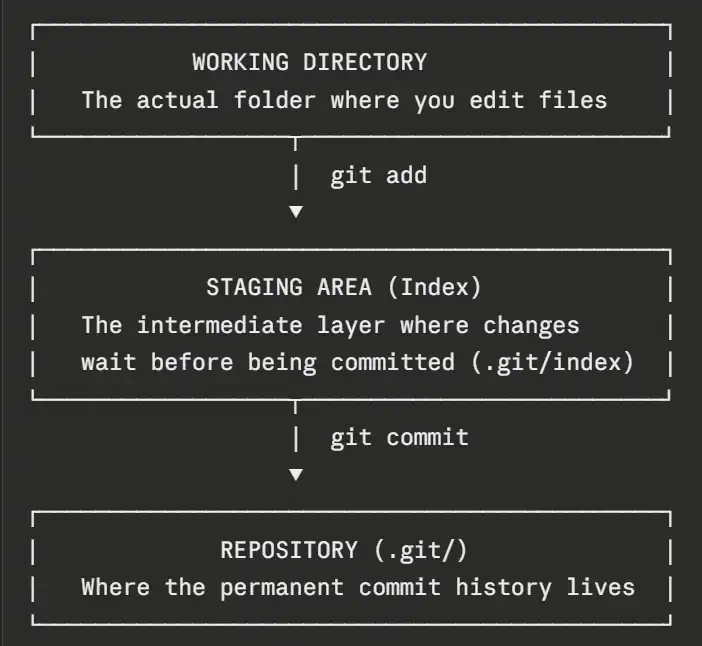
- Working Directory: This is where you write, break, and delete your code — your actual project files. Changes made here are not yet tracked by Git. When you run
git status, they appear as modified or untracked. - Staging Area: Before committing, you must move your changes here. It's a buffer zone where you choose exactly which files — or even which lines — to include in your next commit.
This is one of Git's strengths: instead of committing everything at once, you decide what goes in. Staged changes are physically stored in the.git/indexfile. - Repository: This is where changes are permanently saved using
git commit. It lives inside the.git/folder at the root of your project. Each commit is a full snapshot of your files at that moment — not just the lines that changed, but the entire project state. This is what allows you to go back to any point in history.
Files in the Working Directory appear in red when you run git status, while files moved to the Staging Area appear in green.
Did you know? The Staging Area is actually just a small file calledindexinside your.gitfolder.
Features of the Staging Area
- Partial commits: You can stage only part of a file using
git add -p, even if you've made other changes to that file that you're not ready to commit yet. - Review before committing: Before cutting a new version, you can inspect exactly what's staged using
git diff --staged. If you accidentally staged the wrong file, you can remove it withgit restore --staged <file>. - Clean history: Grouping related changes into focused commits keeps your project history readable and meaningful.
Git is more than a backup tool — it tells the story of how your project evolved. The Staging Area lets you write that story intentionally, one commit at a time.